Drawing large graphs

Hello, I've started using graph-tool mainly because it's faster than networkx. Recently I tried analyzing Wordnet by constructing a graph from all synsets and polysemy relations between them; it has 117659 nodes and 549414 edges. When I run statistics such as degree average, local clustering average and pseudo diameter they only take a few seconds. On the other hand, if I try to draw it with graph_draw it takes 6 hours (using 4 cores, and about 24hs of combined CPU time) or graphviz_draw (which I haven't run for more than an hour). Initially I thought the bottleneck was in using labels (which I removed afterwards), then in the layout algorithm (before confirming that random layout takes only a few seconds), and finally outputting pixels instead of vectors (svg instead of png), but none of them seemed to have to do with it. Also, saving the graph also takes just a few seconds. I have uploaded it in xml.gz format here (it's 6.4MB): http://www.sendspace.com/file/zc7yrh If you have any suggestions please let me know. Thanks in advance, Alejandro -- View this message in context: http://main-discussion-list-for-the-graph-tool-project.982480.n3.nabble.com/... Sent from the Main discussion list for the graph-tool project mailing list archive at Nabble.com.

On 11/30/2012 05:45 PM, alepulver wrote:
Hello,
I've started using graph-tool mainly because it's faster than networkx. Recently I tried analyzing Wordnet by constructing a graph from all synsets and polysemy relations between them; it has 117659 nodes and 549414 edges.
When I run statistics such as degree average, local clustering average and pseudo diameter they only take a few seconds. On the other hand, if I try to draw it with graph_draw it takes 6 hours (using 4 cores, and about 24hs of combined CPU time) or graphviz_draw (which I haven't run for more than an hour).
Initially I thought the bottleneck was in using labels (which I removed afterwards), then in the layout algorithm (before confirming that random layout takes only a few seconds), and finally outputting pixels instead of vectors (svg instead of png), but none of them seemed to have to do with it. Also, saving the graph also takes just a few seconds.
I have uploaded it in xml.gz format here (it's 6.4MB): http://www.sendspace.com/file/zc7yrh
The time is certainly being spent on the layout code. Random layout is always very fast, but it is not what is used internally by graph_draw(), which uses instead sfdp_layout(). The graph you supplied has exactly 64835 connected components, one of which is giant (~31% of the vertices), and the remaining are components of very small size (mostly 1 or 2), composed mostly of single vertices with self-loops. The multilevel layout algorithm in sfdp_layout() does not handle this very well, since it does not collapse multiple components together during the coarsening phase. I recommend simply drawing the largest component, as such: g = GraphView(g, vfilt=label_largest_component(g)) pos = sfdp_layout(g, verbose=True) # This way you get more information # about the layout progress graph_draw(g, pos=pos, output="output.png") The result with ~70% of the network composed of single isolated vertices would not look very informative, in any case. When drawing large graphs, it is recommended to look closely at all the options which can be given to sfdp_layout(), since they can often dramatically change the speed and the quality of the result (although the default behavior should be good enough in most cases). Cheers, Tiago -- Tiago de Paula Peixoto <tiago@skewed.de>
On 11/30/2012 06:25 PM, Tiago de Paula Peixoto wrote:
g = GraphView(g, vfilt=label_largest_component(g)) pos = sfdp_layout(g, verbose=True) # This way you get more information # about the layout progress graph_draw(g, pos=pos, output="output.png")
BTW, this took only a couple of minutes on my laptop. The result is attached. Unfortunately, the result is pretty much a ridiculogram[1], as is often the case for large networks, which are not tree-like. [1] http://www.youtube.com/watch?v=YS-asmU3p_4 -- Tiago de Paula Peixoto <tiago@skewed.de>
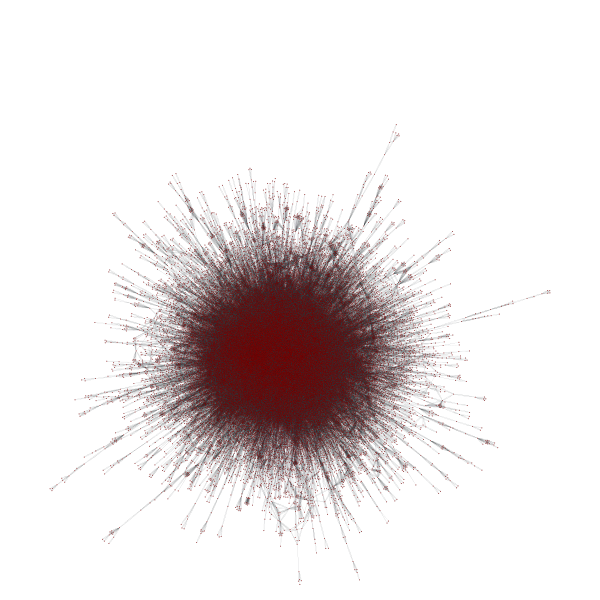
Thank you very much, now I can draw it in 5 minutes. As you pointed out, there are many vertices with self-loops. This was my mistake in the algorithm for the transitive closure; the result should be the biggest component you filtered. I thought that graph_draw() used sfdp_layout() in case "pos" wasn't supplied (i.e. None), so I used: pos = gt.random_layout(polysemy) gt.graph_draw(polysemy, pos=pos, output_size=(10000,10000), output='ejercicio_5_rnd.png') Expecting it would take less time. Maybe this paragraph in the documentation should be changed: "Vector-valued vertex property map containing the x and y coordinates of the vertices. If not given, it will be computed using sfdp_layout()." In particular, my idea was to reduce node size and color edges according to different criteria. This is explained in the documentation, so I can check it by myself. Also I would like to see nodes expanded through the canvas, because they are densely packed into a corner. What is the option for controlling this? Cheers, Alejandro -- View this message in context: http://main-discussion-list-for-the-graph-tool-project.982480.n3.nabble.com/... Sent from the Main discussion list for the graph-tool project mailing list archive at Nabble.com.
On 11/30/2012 07:06 PM, alepulver wrote:
I thought that graph_draw() used sfdp_layout() in case "pos" wasn't supplied (i.e. None), so I used: pos = gt.random_layout(polysemy) gt.graph_draw(polysemy, pos=pos, output_size=(10000,10000), output='ejercicio_5_rnd.png') Expecting it would take less time.
It should!
Maybe this paragraph in the documentation should be changed: "Vector-valued vertex property map containing the x and y coordinates of the vertices. If not given, it will be computed using sfdp_layout()."
But this is correct. Does it really take five hours if you supply pos = random_layout() ?!
Also I would like to see nodes expanded through the canvas, because they are densely packed into a corner. What is the option for controlling this?
The bounding box is calculated automatically if fit_view=True. If you set it False, the positions will be considered to correspond to the output format units (pixels in case of png, points in case of pdf, etc). If you are getting strange-looking results with fit_view=True, then please send me an example. Cheers, Tiago -- Tiago de Paula Peixoto <tiago@skewed.de>
On 11/30/2012 04:41 PM, Tiago Peixoto [via Main discussion list for the graph-tool project] wrote:
But this is correct. Does it really take five hours if you supply pos = random_layout() ?!
The one that took 6 hours was without supplying "pos". When I supplied a random one, it took more than 2 hours and I stopped it. Strangely, unlike the former it uses only one CPU. I believe graph_draw is taking too long, because random_layout finishes almost immediatly. When using your code to filter the largest component it takes 5 minutes, most of the time processing the layout (as shown with the verbose option you suggested). But graph_draw is not wasting time calculating the graph layout when supplied random positions, I don't know what it could be doing. Does it also happen to you: pos = gt.random_layout(polysemy) print "here" gt.graph_draw(polysemy, pos=pos, output='ejercicio_5_gv.png')
Also I would like to see nodes expanded through the canvas, because they are densely packed into a corner. What is the option for controlling this?
The bounding box is calculated automatically if fit_view=True. If you set it False, the positions will be considered to correspond to the output format units (pixels in case of png, points in case of pdf, etc).
If you are getting strange-looking results with fit_view=True, then please send me an example. I've attached a screenshot, which shows unused space in the image.
I would like to separate nodes as much as possible so that edges are visible, or strech them to fit the picture at least. Cheers, Alejandro Screenshot from 2012-11-30 20:42:02.png (518K) <http://main-discussion-list-for-the-graph-tool-project.982480.n3.nabble.com/attachment/4024850/0/Screenshot%20from%202012-11-30%2020%3A42%3A02.png> -- View this message in context: http://main-discussion-list-for-the-graph-tool-project.982480.n3.nabble.com/... Sent from the Main discussion list for the graph-tool project mailing list archive at Nabble.com.
On 12/01/2012 12:54 AM, alepulver wrote:
On 11/30/2012 04:41 PM, Tiago Peixoto [via Main discussion list for the graph-tool project] wrote:
But this is correct. Does it really take five hours if you supply pos = random_layout() ?!
The one that took 6 hours was without supplying "pos". When I supplied a random one, it took more than 2 hours and I stopped it. Strangely, unlike the former it uses only one CPU. I believe graph_draw is taking too long, because random_layout finishes almost immediatly.
When using your code to filter the largest component it takes 5 minutes, most of the time processing the layout (as shown with the verbose option you suggested). But graph_draw is not wasting time calculating the graph layout when supplied random positions, I don't know what it could be doing.
Does it also happen to you: pos = gt.random_layout(polysemy) print "here" gt.graph_draw(polysemy, pos=pos, output='ejercicio_5_gv.png')
This took only about 2 seconds on my machine... I have no idea how it could take two hours.
I've attached a screenshot, which shows unused space in the image.
I would like to separate nodes as much as possible so that edges are visible, or strech them to fit the picture at least.
There is obviously something wrong with the bounding box calculation. I'll take a look into it. Cheers, Tiago -- Tiago de Paula Peixoto <tiago@skewed.de>
On 12/03/2012 01:24 PM, Tiago Peixoto [via Main discussion list for the graph-tool project] wrote:
On 12/01/2012 12:54 AM, alepulver wrote:
Does it also happen to you: pos = gt.random_layout(polysemy) print "here" gt.graph_draw(polysemy, pos=pos, output='ejercicio_5_gv.png') This took only about 2 seconds on my machine... I have no idea how it could take two hours.
I made a mistake. My program was also using "output_size=(10000, 10000)". With the default value it takes a few seconds. But is it supposed to take so much when increasing output size? The most expensive part should be calculating node positions, as you said.
I've attached a screenshot, which shows unused space in the image.
I would like to separate nodes as much as possible so that edges are visible, or strech them to fit the picture at least.
There is obviously something wrong with the bounding box calculation. I'll take a look into it. Thanks.
Cheers, Alejandro -- View this message in context: http://main-discussion-list-for-the-graph-tool-project.982480.n3.nabble.com/... Sent from the Main discussion list for the graph-tool project mailing list archive at Nabble.com.
On 12/03/2012 10:21 PM, alepulver wrote:
On 12/03/2012 01:24 PM, Tiago Peixoto [via Main discussion list for the graph-tool project] wrote:
On 12/01/2012 12:54 AM, alepulver wrote:
Does it also happen to you: pos = gt.random_layout(polysemy) print "here" gt.graph_draw(polysemy, pos=pos, output='ejercicio_5_gv.png') This took only about 2 seconds on my machine... I have no idea how it could take two hours.
I made a mistake. My program was also using "output_size=(10000, 10000)". With the default value it takes a few seconds.
But is it supposed to take so much when increasing output size? The most expensive part should be calculating node positions, as you said.
If you use the PNG format it has to construct a huge 10000x10000 matrix, and paint he pixels inside the vertices, edges, etc. Everything should scale roughly with the area of the figure. This does not happen of course with vector formats, such as SVG and PDF, where the size of the figure is just a number. Cheers, Tiago -- Tiago de Paula Peixoto <tiago@skewed.de>
participants (2)
-
 alepulver
 -
 Tiago de Paula Peixoto